Teardown: Terraform’s State Logic & The Idempotent Provisioning Process
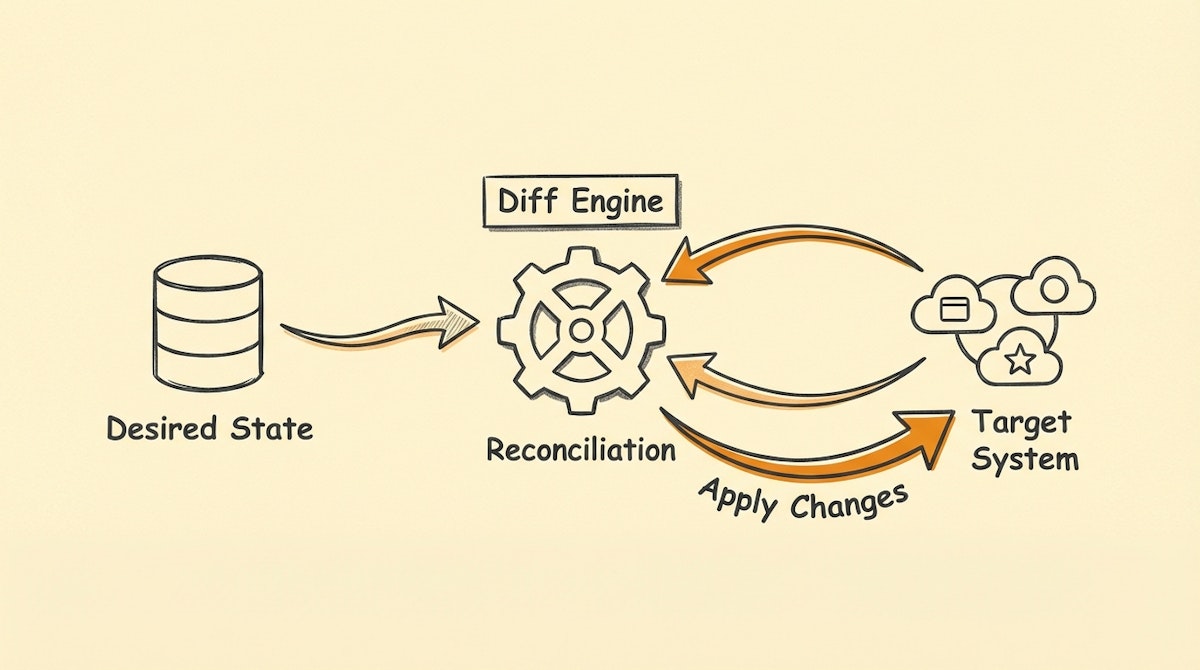
The standard approach to internal automation—specifically for onboarding or user provisioning—usually follows a linear "trigger-and-action" model. A new employee is added to the HRIS, and a webhook triggers a sequence of actions: create a Slack account, provision a Jira license, and send a welcome email.
While this works in happy-path scenarios, I have observed that it often fails in the real world. If the automation times out halfway through, retrying it creates duplicates. If an employee is rehired, the script fails because the account already exists. Ops managers often find themselves manually cleaning up the mess left by "dumb" automations.
To solve this, we can borrow a foundational concept from DevOps: Infrastructure as Code, specifically the logic used by tools like HashiCorp’s Terraform.
Terraform doesn't just run scripts blindly; it manages State. It looks at what should exist (Desired State), checks what actually exists (Current State), and then performs only the necessary actions to bridge the gap. This property is called Idempotency.
Below is a blueprint for implementing the Idempotent Provisioning Process using low-code tools like Make or n8n, ensuring your internal operations are self-healing and duplicate-proof.
The Architecture of Idempotency
Instead of a linear flow, this blueprint functions as a reconciliation loop. It consists of three core components that separate the definition of access from the execution of access.
1. The Desired State Registry (The "TF Plan")
In this architecture, your automation does not react to a momentary event (like a webhook). Instead, it reacts to a database record that acts as the "Source of Truth."
Typically hosted in Airtable or a dedicated SQL database, this registry contains a list of users and the resources they should have access to. It is static and declarative.
- Example Record: User:
jane.doe@company.com| Role:Engineering| Entitlements:[Slack, GitHub, AWS]| Status:Active
2. The State Reader (The "Diff" Engine)
This is the most critical and often overlooked step. Before attempting to create an account, the automation must query the target system to understand the current reality.
In a tool like n8n or Make, this step involves:
- Fetching the Desired State: Get the row from Airtable.
- Fetching the Current State: Call the Slack/GitHub API to search for
jane.doe@company.com. - Calculating the Delta: Compare the two. Does the user exist in the app but not the registry? (Unauthorized access). Do they exist in the registry but not the app? (Missing access).
3. The Reconciler (The "Apply" Phase)
Based on the "Delta" calculated above, the logic routes to one of three paths:
- Create (Provision): The user is missing. Run the creation logic.
- Update (Sync): The user exists, but their role is wrong (e.g., they moved from Support to Engineering). Update the permissions.
- No-Op (Skip): The user exists and is configured correctly. Do nothing.
This "No-Op" path is what makes the system idempotent. You can run this automation every hour, and if everything is correct, it will simply do nothing. This creates a highly reliable system that self-corrects data drift without human intervention.
Comparison: Linear vs. State-Based Automation
The following comparison highlights why moving to a state-based approach reduces the maintenance burden for internal ops teams.
| Feature | Linear Trigger (Standard) | State-Based (Idempotent) |
|---|---|---|
| Retry Logic | Risk of Duplicates | Safe to Retry |
| Error Handling | Brittle (Stops on Fail) | Self-Healing |
| Auditability | Low (Logs only) | High (Diff Logs) |
Implementation Strategy
For an Ops Manager looking to deploy this, I suggest starting with a single high-impact system, such as your CRM or Project Management tool access.
- Centralize the Roster: Build a view in Airtable that explicitly lists every user and the access level they require.
- Build the Reader: Create a scheduled scenario (running daily) that fetches this roster and checks the target API.
- Gate the Action: Use a "Router" module in Make or "Switch" node in n8n. Only proceed to the "Create User" API call if the Reader confirms the user ID is null/empty.
By adopting the Idempotent Provisioning Process, you move away from "fire-and-forget" scripts that require constant babysitting. You build a system that converges on accuracy over time, much like how modern cloud infrastructure is managed at scale.
References
- HashiCorp Terraform - Intro to Infrastructure as Code: https://developer.hashicorp.com/terraform/intro
- Make (Integromat) - Router Modules: https://www.make.com/en/help/modules/router
- N8N - Merge Nodes for Data Reconciliation: https://docs.n8n.io/integrations/builtin/core-nodes/n8n-nodes-base.merge/

