Escaping The Hardcoded Logic Trap With The Externalized Configuration Process
Speed is often the enemy of scalability. When we are tasked with automating a process—say, routing inbound leads based on territory or approving expenses based on a threshold—the instinct is to build fast.
I often observe Internal Ops Managers, myself included, taking the shortest path: hardcoding the business rules directly into the automation steps. We open a filter in Make or n8n and set the condition: If Region equals "North America" or If Amount is greater than 500.
It works immediately. It feels efficient. But in the context of Strategic Alignment, this is a foundational mistake. By embedding volatile business logic inside the technical workflow, we unknowingly turn the automation into a "black box" that only we can maintain. The moment the VP of Sales changes the territory definition, or the CFO adjusts the spending limit, the automation is effectively broken until we manually intervene.
This creates a bottleneck where the Ops team is stuck doing maintenance work instead of building value. To align automation with business agility, I recommend adopting a concept from software engineering—specifically the 12-Factor App methodology—and applying it to low-code: The Externalized Configuration Process.
The Mistake: Coupling Logic with Execution
The core issue is the tight coupling of "What to do" (the workflow) and "When to do it" (the rules). When these are fused together, every change in business strategy requires a "deployment" update to the automation script.
I suspect many of us fall into this trap because we view automation platforms as scripting tools rather than architectural components. However, hardcoding values creates two major risks:
- Opacity: Stakeholders (HR, Finance, Sales) cannot see the rules driving the system. They have to ask you, "What is the current threshold?"
- Fragility: Complex logic often gets duplicated across multiple scenarios. Updating a rule in one place but missing another leads to inconsistent data states.
The Solution: The Externalized Configuration Process
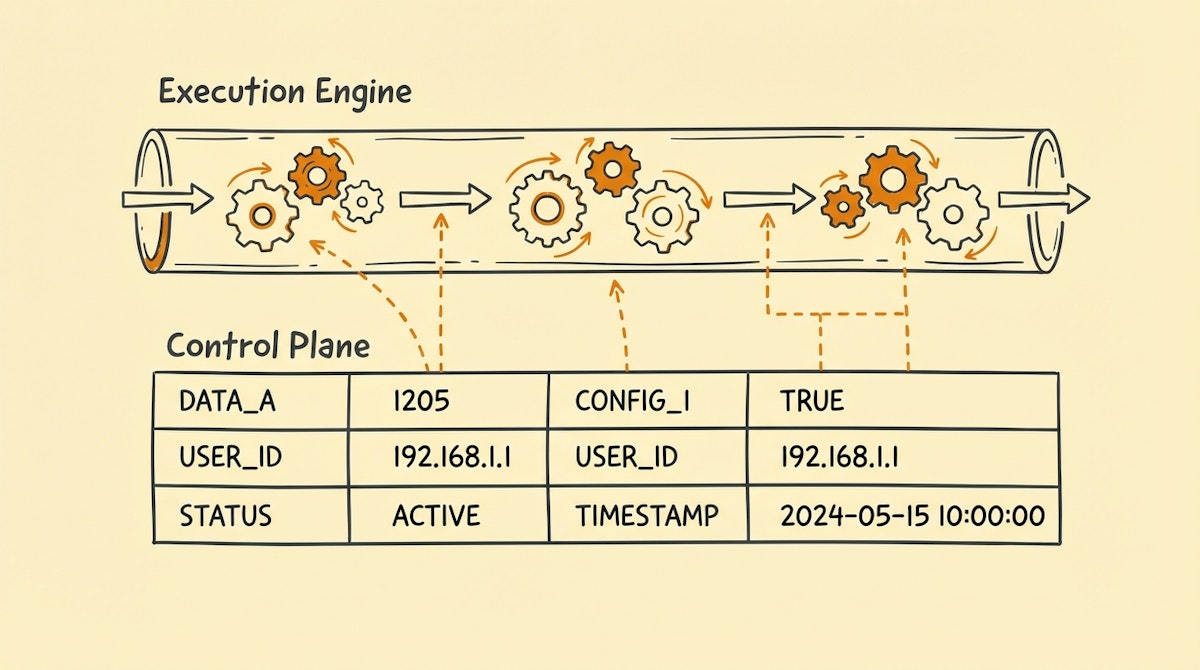
The alternative is to treat your automation tool (Make, n8n, Zapier) purely as the Execution Engine and offload the decision-making logic to a separate Control Plane (like Airtable, Google Sheets, or a specialized database).
This approach aligns with the Separation of Concerns principle. The automation effectively says: "I don't know what the limit is; I will ask the Control Plane, get the current rule, and then execute."
Here is how to structure this process.
Phase 1: Audit for Volatility
Before building, or during a refactor, I look for "Volatile Variables." These are data points that are determined by business policy, not by technical requirements. Common examples include:
- Thresholds: Dollar amounts, lead scores, time delays.
- Routing Maps: Which salesperson handles which zip code.
- Communication Templates: Subject lines, Slack channel IDs, email bodies.
If a value is likely to change once a quarter, it does not belong in your code.
Phase 2: Build the Control Plane
Create a dedicated table in your database (e.g., Airtable) specifically for configuration. This table should be accessible to the non-technical stakeholders who own the policy.
For example, if you are automating expense approvals, create a Global_Variables table. It might look like this:
- Variable Name:
MAX_AUTO_APPROVAL_LIMIT - Value:
500 - Description: "Expenses below this are auto-approved."
- Owner: Finance Team
Now, the Finance team can change 500 to 700 without ever logging into your automation account.
Phase 3: The Dynamic Fetch Step
In your automation workflow, replace the hardcoded filter with a dynamic lookup step.
- Trigger: Expense Submitted.
- Action:
Get RecordfromGlobal_Variableswhere Name =MAX_AUTO_APPROVAL_LIMIT. - Filter: If
Expense Amount<Value(from Step 2).
This adds one operation to your cost, but the ROI in terms of governance and agility is massive. You are essentially giving the "admin panel" of the automation to the business unit.
Comparison: Hardcoded vs. Externalized
The shift changes the role of the Ops Manager from a gatekeeper to an architect.
| Feature | Hardcoded Logic | Externalized Config |
|---|---|---|
| Maintenance Cost | High (Requires Dev) | Low (Self-Serve) |
| Visibility | Hidden in Code | Visible in Dashboard |
| Agility | Slow (Release Cycle) | Instant (Real-time) |
| Risk | Inconsistency | Unauthorized Change |
Implementing Governance
One valid concern with this approach is safety. If anyone can change the rule, what prevents a disaster?
This is where access rights come in. In Airtable or Google Sheets, you can lock the Value column to specific users (e.g., the CFO). Furthermore, you can add an automation that notifies the Ops team whenever a configuration record is modified.
This creates an audit trail, satisfying the compliance needs of the "Strategic Alignment" theme. You know exactly who changed the rule and when, without having to dig through version histories of your Make scenarios.
Conclusion
The goal of the Internal Ops Manager is not just to automate tasks, but to build resilient systems that adapt to the company's changing strategy.
By moving away from hardcoded logic and embracing the Externalized Configuration Process, you reduce the fragility of your operations. You allow the business to pivot its strategy—changing territories, limits, or messaging—while your infrastructure remains rock solid.
References
- The 12-Factor App Methodology (Config): https://12factor.net/config
- Separation of Concerns (Computer Science Principle): https://en.wikipedia.org/wiki/Separation_of_concerns

