Structured Forms vs. Conversational Interfaces: Reducing Friction In Internal Ops
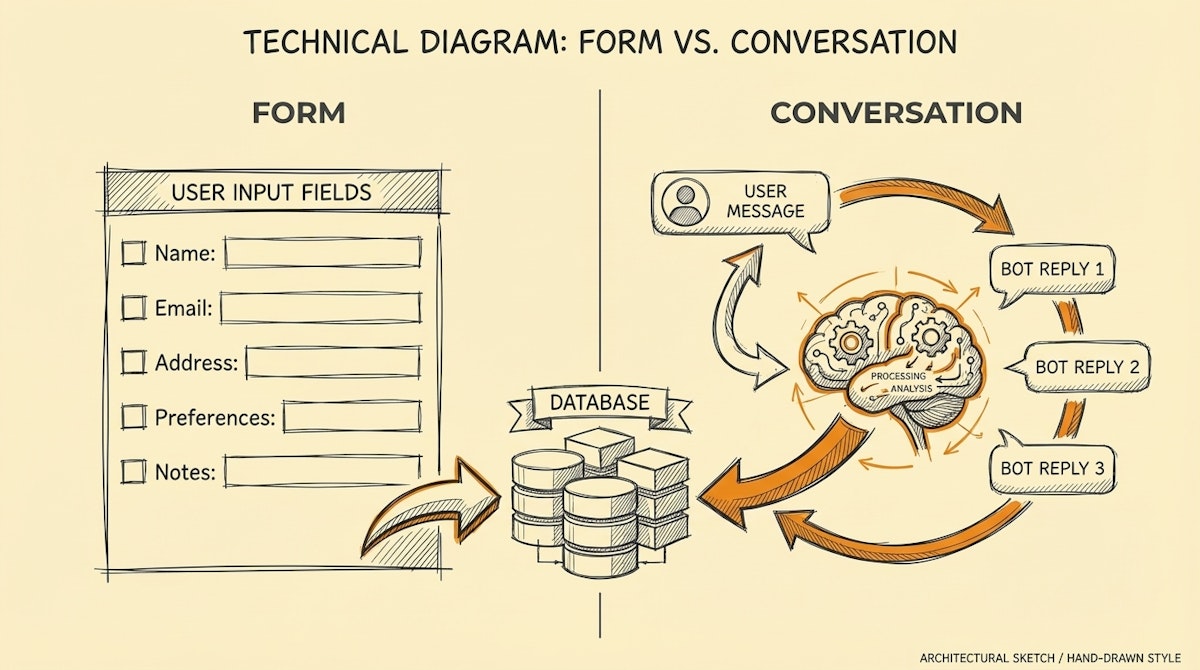
We often fall into a trap when designing internal processes: we optimize for the database, not the human.
I have observed this pattern frequently in operations teams. We build comprehensive Airtable forms or strict Jira Service Management portals to ensure we get perfectly structured data for every IT request or HR query. The logic is sound—standardized input leads to standardized output.
But the reality of human behavior is different. Users perceive these forms as high-friction barriers. Instead of navigating to a bookmarked URL and filling out ten required fields, they take the path of least resistance: they send a direct message (DM) to the Ops Manager on Slack or Teams.
This creates a shadow workflow where requests are handled manually in chat, bypassing the automation we spent weeks building.
This article compares two primary methods for capturing internal data: Structured Forms (the traditional approach) and Conversational Interfaces (the emerging LLM-driven approach). We will look at how to balance the need for clean data with the necessity of user adoption.
The Contender: Structured Forms
Structured forms (built via Typeform, Tally, or native portal inputs) are the gold standard for data integrity. They force the user to categorize their problem, define the urgency, and provide necessary context before hitting submit.
- Pros: The data arriving in your automation (e.g., a Make scenario) is deterministic. You know exactly what "Priority: High" means. There is zero ambiguity.
- Cons: High cognitive load. The user must context-switch away from their work, find the link, and conform to the rigid structure of the form. This friction is the primary driver of "shadow DMs."
The Challenger: Conversational Interfaces (ChatOps)
With the rise of Large Language Models (LLMs), it is now feasible to use Slack or Microsoft Teams as the primary ingestion point. Tools like Atlassian Assist (formerly Halp) pioneered this by turning messages into tickets, but modern LLM workflows go further. They parse natural language to extract intents and entities automatically.
- Pros: Zero friction. The user stays in their flow of work. They describe the problem in their own words.
- Cons: The input is unstructured. An LLM might hallucinate a category or miss a critical detail (like a requested date), requiring a back-and-forth loop to clarify.
Comparative Analysis
Here is how these two approaches stack up when architecting internal workflows.
| Criteria | Structured Forms | Conversational Interfaces |
|---|---|---|
| User Friction | High (Context switching) | Low (Natural language) |
| Data Quality | High (Deterministic) | Variable (Probabilistic) |
| Setup Complexity | Low (No-code builders) | High (Requires LLM logic) |
| Adoption Barrier | Resistance to new tools | Near zero (Existing tools) |
The Hybrid Solution: Conversational Slot Filling
Rather than choosing one extreme, I have seen success in implementing a hybrid approach often referred to in Natural Language Understanding (NLU) as Slot Filling.
In this model, the interface remains conversational (Slack/Teams), but the backend logic mimics the rigor of a form. Here is how it functions in a typical Make or n8n workflow:
- Ingestion: The user types a request: "I need a new license for Figma for the design team."
- Extraction: An LLM (like GPT-4o or Claude 3.5 Sonnet) analyzes the text to extract specific parameters defined in your schema: Tool (Figma), Department (Design), Action (License Provisioning).
- Validation: The system checks if all required "slots" are filled. If the Justification field is missing (a requirement for paid tools), the automation does not fail.
- Prompting: The bot replies specifically asking for the missing piece: "I can help with that. Could you provide a brief business justification for the budget approval?"
This method shifts the burden of complexity from the user (who no longer needs to navigate a form) to the automation architect (who must build the error-handling logic).
Technical Implementation Notes
When building this, avoid sending the raw user input directly to an action. Always place an Intermediate Processing Layer between the chat and the database.
For example, if you are using OpenAI's API, utilize Function Calling (or Tool Use) definitions to force the model to output a strictly formatted JSON object. If the JSON is incomplete, trigger the conversational follow-up loop. This technique ensures that while the front end remains messy and human, the back end remains clean and machine-readable.
Conclusion
For high-volume, low-complexity requests (like password resets or simple Q&A), Conversational Interfaces are superior because they maximize adoption. However, for high-stakes workflows (like financial approvals or sensitive data access), the friction of a Structured Form serves a purpose: it ensures intentionality.
The most effective internal ops managers are not just form builders; they are experience designers who know when to reduce friction and when to enforce structure.
References
- Atlassian Assist (Conversational Ticketing): https://www.atlassian.com/software/jira/service-management/product-guide/getting-started/atlassian-assist
- OpenAI Function Calling Guide: https://platform.openai.com/docs/guides/function-calling
- Concept of Slot Filling in NLU: https://en.wikipedia.org/wiki/Dialog_system#Slot_filling

