Eliminate Data Entry Friction With The Parameter Injection Process
One of the hardest lessons I have had to learn as a technical leader is that data integrity is not actually a technical problem—it is a behavioral one.
I used to spend hours designing the perfect Airtable schema. I would set up strict validation rules, complex field types, and elegant interface layouts. And yet, the data I got back from the team was often incomplete, delayed, or riddled with typos. My initial reaction was frustration. Why couldn't they just fill out the Project ID correctly? Why did they skip the Client Context field?
The reality, which I had to accept, was that I was prioritizing my database architecture over their user experience. I was asking busy humans to act like database cursors. The moment I shifted my focus from "enforcing rules" to "removing friction," the data quality improved dramatically.
This brings us to a specific, high-impact technique I call The Parameter Injection Process. It is a method for architecting data ingestion that respects the user's time by never asking for information the system already possesses.
The Friction Gap
Every time you ask a user to input a piece of data, you introduce a micro-decision point.
"What was that project code again?"
"Do I use my full email or the alias?"
"Which category does this request fall under?"
These moments of friction accumulate. Eventually, they result in what I call the "Adoption Drop-off." Users will either bypass your form entirely (Slack-ing you the data instead) or input the bare minimum to get past the required fields. For a Data Analyst, this is a nightmare. You cannot analyze partial data, and you cannot automate meaningful workflows based on incorrect linkage.
The Solution: Context via URL Parameters
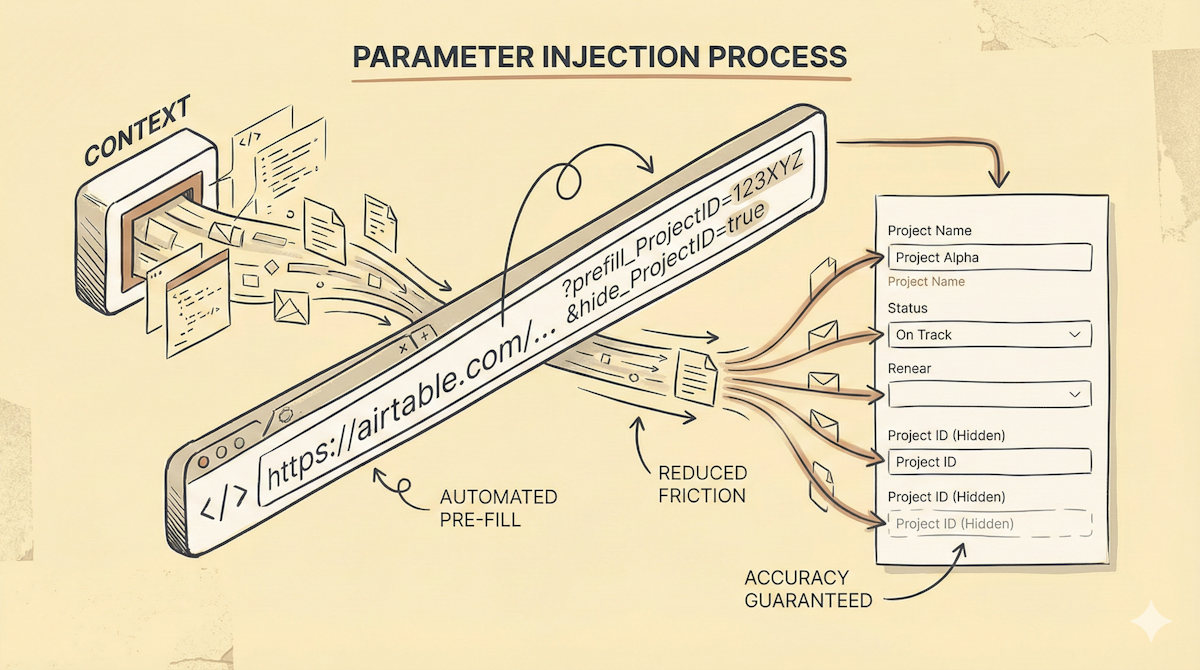
The core of the Parameter Injection Process is utilizing Airtable's ability to accept data through URL parameters (prefill_FieldName). Instead of sending a generic link to a blank form, we use Make to generate and distribute a personalized link that pre-loads the context.
Here is how to build this architecture.
Phase 1: The Construction (Airtable)
First, we need to construct the URL dynamically within Airtable. Let’s say you are building a "Weekly Project Update" workflow. You want the Project Manager to update the status, but you don't want them to have to select the project from a dropdown of 50 active jobs.
Create your Base URL: Grab the share link for your Airtable Form (or Interface Form).
Identify Field IDs: While you can use field names, I strongly recommend using the underlying Field IDs (e.g.,
fldxxxxxxxxxxxxxx). Field names change; IDs do not. This ensures your system is robust against future renaming.Build the Formula: Create a formula field in your
Projectstable calledUpdate_Link.
The formula logic looks like this:
"https://airtable.com/shrxXXXXXXXX" &
"?prefill_ProjectName=" & ENCODE_URL_COMPONENT({Name}) &
"&prefill_ProjectID=" & ENCODE_URL_COMPONENT({Record_ID}) &
"&hide_ProjectID=true"
Note the crucial elements here:
ENCODE_URL_COMPONENT: This is mandatory. If your project name has a space or a special character, the link breaks without this function.hide_ProjectID=true: This is the "humble" part of the design. We need the ID for the database relation, but the human doesn't need to see it. We prefill it and hide it. The form looks cleaner, and the connection is guaranteed to be accurate.
Phase 2: The Distribution (Make)
Now that every record has a unique, context-aware link, we need to get it to the user at the right moment. Sending this link manually defeats the purpose. We use Make to handle the logistics.
Trigger: Set a scheduler (e.g., every Friday at 9:00 AM) or an event-based trigger (e.g., "Status changes to 'Needs Input'").
Action: Search the
Projectstable in Airtable for records matching your criteria.The Hook: Send a Slack message or Email to the project owner.
Instead of saying: "Please go to the portal and update your project," the message says:
"Hey [Name], update the status for [Project Name] here: [Link]"
When they click that link, the Project Name is already typed in. The hidden Project ID ensures the new record they create automatically links back to the main project record. They type the status update and hit submit.
Phase 3: The Data Loop
Because we injected the Record_ID into the form (and likely linked it to a Linked Record field), the incoming data requires zero manual reconciliation. As a Data Analyst, you don't have to clean up "Project Alpha" vs. "Proj. Alpha" entries. The unique ID ensures perfect referential integrity.
Why This Matters for Adoption
This might seem like a small technical tweak, but the psychological impact is significant.
Trust: It shows the user that the system is "smart." It knows who they are and what they are working on.
Speed: You have reduced the time-to-completion from 2 minutes to 30 seconds.
Accuracy: You have physically removed the possibility of human error on the key linking fields.
We often talk about "automation" as replacing humans. In this case, we are using automation to assist humans. By handling the boring context via the Parameter Injection Process, we free them up to focus on the part we actually need: their qualitative input.
Start small. Pick the one form your team hates the most, and try injecting just one field. Watch how the completion rates change.

