Quick Tip: Implementing The Global Kill Switch For Automation Governance
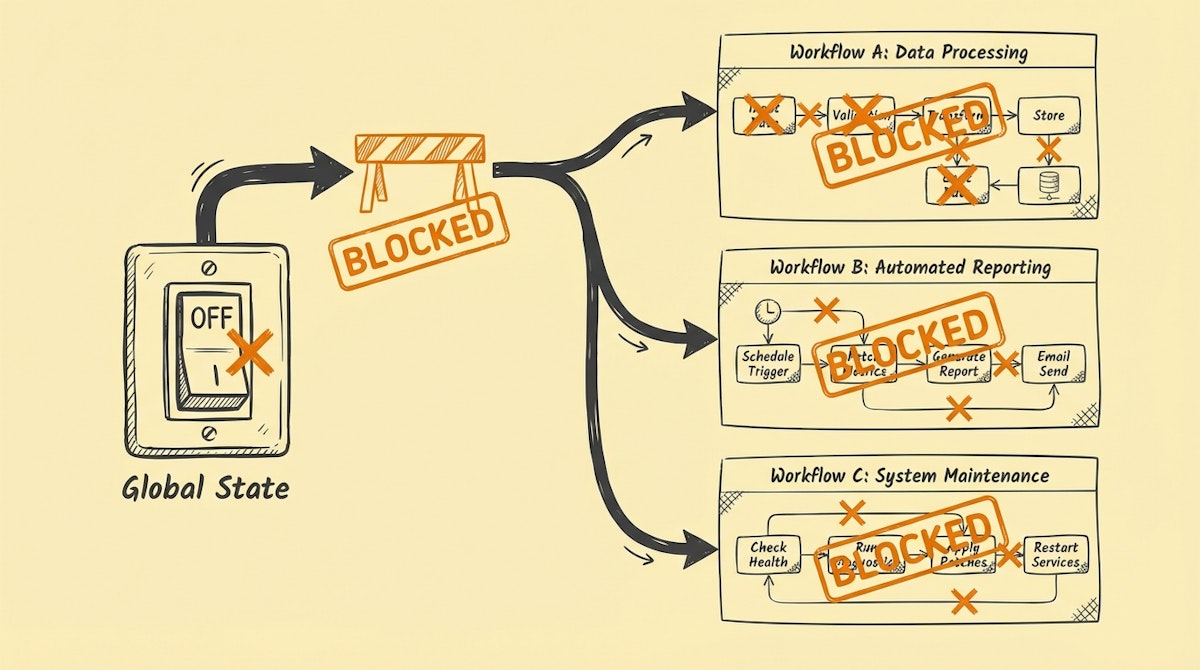
In the software engineering world, there is a well-known concept called "Feature Toggles" or "Feature Flags." Martin Fowler, a renowned voice in software architecture, describes them as a powerful technique to modify system behavior without changing code.
In the world of low-code automation (Sales Ops specifically), we often lack this level of control. We build scenarios in Make, n8n, or Zapier that run autonomously, often triggered by webhooks or schedules.
But what happens when a bad batch of data enters the system? Or when an API update breaks your logic, causing your automation to overwrite clean CRM data with "null" values or error messages?
I have seen instances where a simple logic error in a lead routing workflow corrupted thousands of Salesforce records before anyone noticed. The panic that follows is real. You scramble to log into your automation platform and start manually turning off scenarios one by one. By the time you find the right one, the damage is often done.
This is where The Global Kill Switch comes in.
The Problem: Latency in Emergency Response
When you manage a growing portfolio of automated workflows, response time is your most critical metric during an incident. If you have 20 different active scenarios pushing data into HubSpot or Salesforce, manually identifying and pausing the rogue workflow takes too long.
Furthermore, if you are not the one pressing the buttons—perhaps you are on leave and a junior ops member is handling the crisis—the risk of them pausing the wrong critical infrastructure is high.
We need a mechanism that allows for an immediate, system-wide (or category-wide) "Safety Stop" that decouples the execution of logic from the deployment of the workflow.
The Solution: A centralized "State" Table
The Global Kill Switch is a simple governance pattern. Instead of letting every automation run blindly, you introduce a Gatekeeper Step at the very beginning of your critical workflows.
This step checks a centralized status record—stored in a fast, accessible database like Airtable, Redis, or even a Google Sheet—to verify if execution is currently permitted.
The Setup Process
- Create a Control Table: In your database of choice (e.g., Airtable), create a table named
_CONFIG_AutomationControl. - Define Flags: Create a record with fields like
System_Status(Single Select: "Active", "Emergency Stop") and potentially more granular flags likeEnrichment_StatusorSlack_Notifications_Status. - The Gatekeeper Module: In Make or n8n, the very first module of your scenario (after the trigger) should be a "Get Record" step that retrieves this specific configuration row.
- The Filter: Immediately after retrieving the record, add a filter.
- Rule: Only proceed if
System_Statusis equal to "Active".
- Rule: Only proceed if
If you flip the switch in Airtable to "Emergency Stop," every single automation equipped with this gatekeeper will trigger, check the status, and stop immediately before performing any write operations.
Analyzing the Trade-offs
Implementing this pattern does introduce friction. You are adding an operation (and a potential cost) to every run. However, for Sales Ops managing revenue-critical data, this cost is effectively an insurance premium.
| Feature | Manual Deactivation | Global Kill Switch |
|---|---|---|
| Response Time | Slow (Minutes to Hours) | Instant (Seconds) |
| Granularity | Scenario by Scenario | Batch Control (Tag-based) |
| Operational Cost | None (Passive) | 1 Read Op per Run |
| Risk Mitigation | Reactive | Proactive Governance |
Advanced Implementation: Granular Control
Once you have the basic mechanism, you can refine it. You don't always want to shut down everything. You might only want to stop data enrichment while keeping lead routing active.
By adding multiple columns to your Control Table (e.g., Allow_Enrichment, Allow_Email_Sending, Allow_CRM_Writes), you can place specific filters in relevant branches of your automations.
For example, if your Clearbit API quota is exhausted and returning errors, you can toggle Allow_Enrichment to "OFF." Your automations continue to route leads, but they skip the enrichment branch, preventing empty data from overwriting existing fields.
Conclusion
Governance in automation isn't just about permissions; it is about controllability.
The Global Kill Switch transforms your role from a frantic firefighter trying to find the source of the smoke to a system operator with a control panel. It allows you to pause, investigate, and fix issues without the pressure of ongoing data corruption.
While it costs an extra operation per run, the value of preventing a mass CRM data disaster is unquantifiable.

