Forecasting The Shift To The Draft-And-Verify Interface In Finance
We often talk about automation as if the goal is to remove the human entirely from the loop. In marketing or sales, this is often acceptable; if an AI sends a slightly generic email, the risk is low. However, in financial operations, the tolerance for error is effectively zero. A wrong decimal point or a misallocated General Ledger (GL) code isn't a bug—it’s a liability.
From my observations in the industry, the biggest barrier to adoption for Financial Controllers isn't the capability of the tools—it's trust. They don't want a "magic black box" that processes invoices silently. They want visibility.
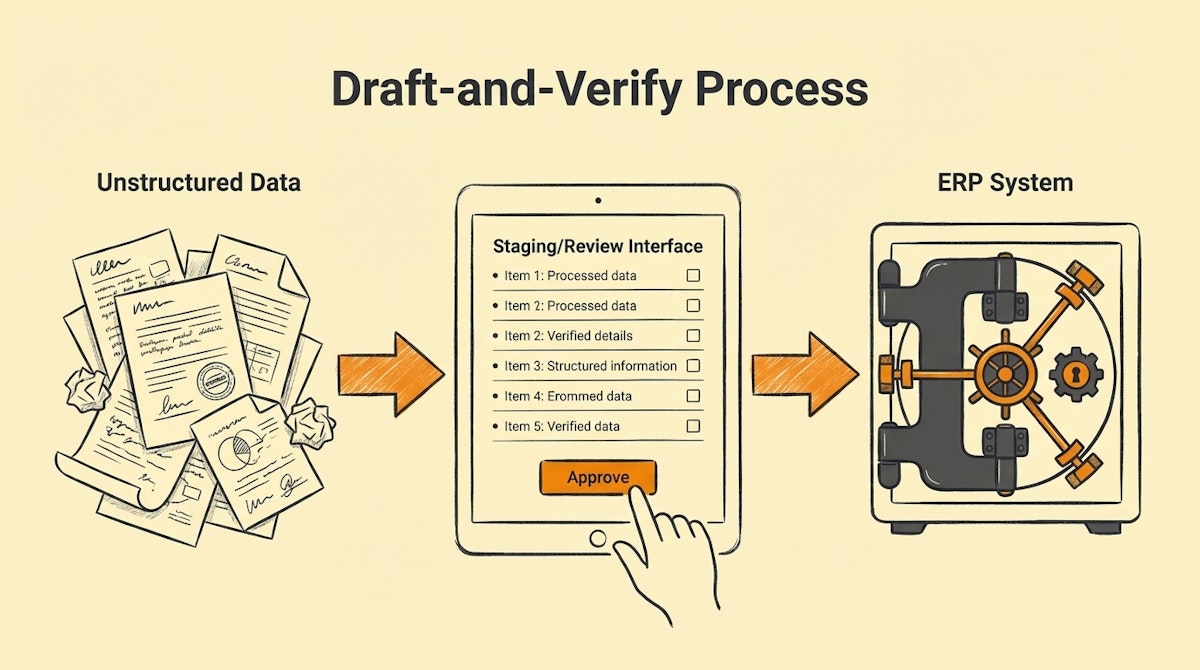
Here is my forecast for the next 6-12 months: The most successful finance automations will not be those that execute tasks autonomously, but those that stage tasks for one-click human verification. We are moving away from "Automated Execution" toward the Draft-and-Verify Approach.
The Friction: Probabilistic AI vs. Deterministic Finance
The core tension lies in the nature of the technologies we use. Modern automation relies heavily on LLMs (like GPT-4 or Claude) to parse unstructured data (invoices, receipts, contracts). These models are probabilistic—they guess the most likely next token.
Finance, conversely, is deterministic. A transaction must balance. It fits into a specific tax category or it doesn't. When we try to force probabilistic tools to do deterministic work without supervision, Financial Controllers rightfully push back. They end up spending more time auditing the automation's work than they would have spent doing the data entry themselves.
The Forecast: The Rise of the "Staging Layer"
I predict that the standard architecture for finance operations will shift. Instead of building workflows that go directly from Input (Invoice) to Output (ERP Entry), successful builds will introduce a Staging Layer.
This approach splits the process into two distinct phases:
- The Assembly (AI/Automation): The system gathers data, extracts information, classifies expenses, and prepares the transaction. Crucially, it does not post to the accounting software.
- The Approval (Human): The system presents the "draft" transaction in a simplified UI. The controller reviews it, perhaps corrects one field, and clicks "Approve." Only then does the API trigger the final entry.
This solves the adoption problem. The controller feels like a pilot, not a passenger.
Comparing Approaches
To visualize why this shift is necessary for user buy-in, let’s look at the operational differences.
| Feature | Black Box Automation | Draft-and-Verify Approach |
|---|---|---|
| User Visibility | Low (Logs only) | High (Frontend Interface) |
| Error Correction | Reactive (Fixing mess in ERP) | Proactive (Fixing before sync) |
| Controller Trust | Low (Anxiety inducing) | High (Control retained) |
| Setup Complexity | Low (Direct Logic) | Moderate (Requires UI) |
Implementing the Staging Architecture
For those looking to build this, the stack is becoming clearer. It usually involves an integration platform (Make or n8n), a database (Airtable or PostgreSQL), and a frontend (Softr, Stacker, or internal tools).
Here is how I see this workflow structured:
1. Ingestion and Extraction
An invoice arrives via email. The automation tool triggers an OCR or LLM process to extract the vendor, date, line items, and attempts to predict the GL code based on historical data.
2. The "Pending" State
Instead of sending this payload to Xero or NetSuite, the automation creates a record in a database (e.g., Airtable) marked as Status: Draft. It also assigns a Confidence Score. If the AI is 99% sure, it flags it as "Low Risk." If it's unsure about the tax code, it flags it as "Review Needed."
3. The Human Interface
The Financial Controller doesn't log into the automation tool. They log into a simple dashboard. They see a list of 50 drafted invoices. They can batch-approve the high-confidence ones and drill down into the complex ones. This interface is the key to user experience. It turns a 4-hour data entry task into a 15-minute review session.
4. Final Execution
Once the status changes to Approved in the database, a second automation triggers. This workflow is simple and rigid: it takes the validated data and pushes it to the ERP. Because the data was human-verified, this step rarely fails.
Conclusion
We need to stop trying to automate decisions and start automating preparation. The Financial Controller’s value isn't in typing data; it's in ensuring accuracy and compliance.
By adopting a Draft-and-Verify Approach, we respect the user's need for control while delivering the efficiency of AI. The future of finance automation isn't about replacing the human; it's about giving them a better dashboard.
References
- Concept of Human-in-the-Loop (HITL): https://arxiv.org/abs/2108.00941
- Airtable Interfaces for Operations: https://www.airtable.com/product/interface-designer
- Make.com Integration Patterns: https://www.make.com/en/blog

