Architecting the Atomic ROI Ledger to Audit Automation Value
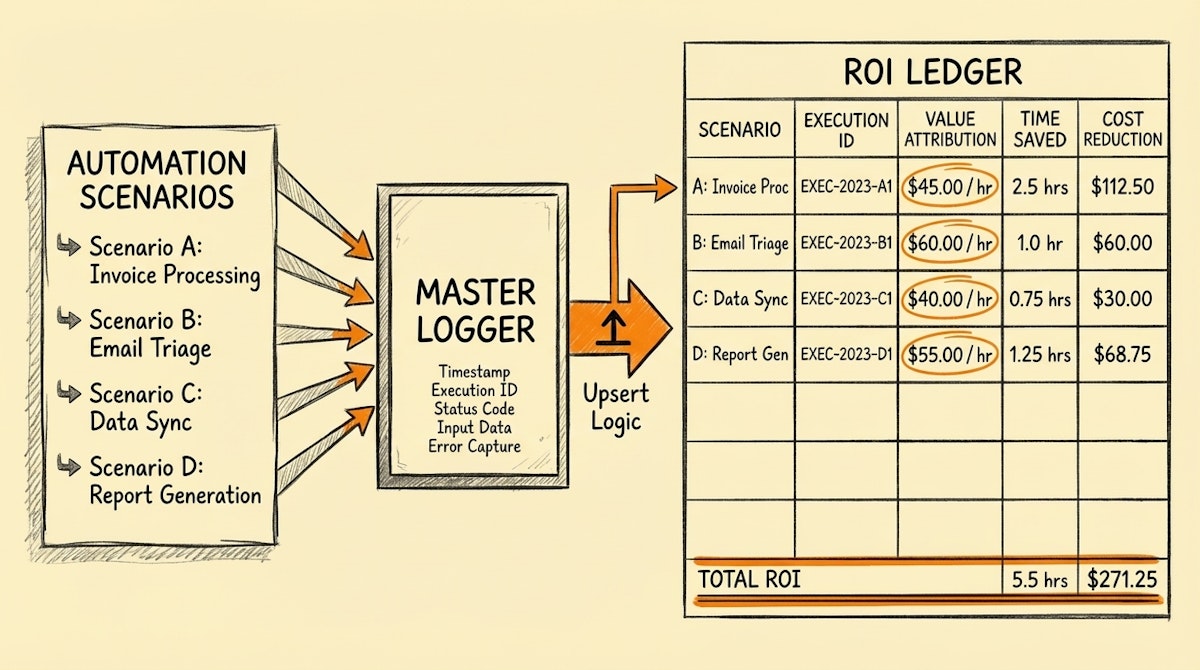
The Invisible Output Problem
There is a specific moment during budget reviews that most Sales Ops managers dread. It is when leadership asks for the hard numbers on the automation stack. We often point to proxy metrics: volume of leads processed, emails sent, or API calls made. But when pressed on the exact dollar value saved or revenue generated specifically by a background workflow, the answer often relies on rough estimates or back-of-the-napkin math.
I have found that the gap between "we think this saves time" and "this specific scenario saved $4,200 last month" is rarely a lack of data. It is a lack of architectural discipline. We build automations to perform actions, not to audit themselves.
To bridge this gap, I moved away from aggregate reporting and started implementing what I call The Atomic ROI Ledger. This is a deep dive into the technical implementation of logging automation value at the transactional level, using Make execution IDs and Airtable upsert logic to create an irrefutable audit trail.
The Concept: Automation as a Transaction
The core philosophy here is treating every successful automation run as a financial transaction. Just as you would not accept a bank statement that only guesses your balance based on average spending, you should not accept an automation report that guesses value based on average time saved.
Every time a scenario runs successfully, it should "pay" a dividend into a central ledger. To do this reliably, we need to solve for Idempotency—ensuring that if a scenario accidentally runs twice or retries, we do not count the value double.
Step 1: The Ledger Schema (Airtable)
Before touching the automation logic, we need a destination. In Airtable, create a dedicated table called System_Logs or ROI_Ledger. This is not for operational data (leads, deals), but for meta-data.
The critical fields are:
- Execution ID (Primary Key): This is the unique identifier from Make.
- Scenario Name: Single Select or Linked Record.
- Timestamp: Date/Time.
- Value Type: Single Select (e.g., "Time Saved", "Revenue Attribution", "Cost Avoidance").
- Unit Value: Number (e.g., 5 minutes, $0.50).
- Total Value: Formula (
Unit Value*Cost per Minuteor direct currency).
Step 2: The Orchestration Logic (Make)
The technical challenge is injecting this logging mechanism without cluttering your business logic. I recommend using the Error Handler or a Router at the very end of your critical flows.
Accessing the Metadata
In Make, every scenario run generates a unique string accessible via the system variable {{context.executionId}}. This is our immutable reference.
The Upsert Pattern
To ensure data integrity, we do not just "Create a Record." We must use an Upsert (Update or Insert) pattern. This protects our ROI calculation from retry loops.
- Module: Airtable - Upsert Record.
- Key Field: Set this to your
Execution IDcolumn. - Value: Map
{{context.executionId}}from the system variables. - Payload: Populate the
Scenario Name,Timestamp, and hardcode theUnit Valuefor that specific process (e.g., if the process automates a task that takes a human 10 minutes, the unit value is 10).
By using the Execution ID as the key, if the scenario fails halfway and retries the final step, Airtable will simply update the existing log rather than creating a duplicate entry. This guarantees zero-drift tracking.
Advanced Implementation: Dynamic Attribution
For more complex value realization—specifically revenue attribution—we can move beyond static time savings. If an automation handles a "Closed Won" status change, the Unit Value shouldn't be hardcoded. It should inherit the Deal Value from the CRM.
In this architecture, you map the CRM Deal Value into the Ledger's value field. This allows you to run a roll-up query at the end of the month stating: "This automation touched $500k worth of pipeline," versus "This automation saved 5 hours."
The "Watchdog" Scenario
If you have dozens of scenarios, adding a logging module to every single one creates technical debt. A cleaner, more advanced approach is to use Make's Webhooks.
- Create a separate "Master Logger" scenario that starts with a Custom Webhook.
- In your operational scenarios, add an HTTP module at the end that POSTs a JSON payload to the Master Logger.
- The JSON payload contains:
{"executionId": "{{context.executionId}}", "scenario": "Lead Routing", "value": 10}. - The Master Logger handles the Airtable Upsert logic centrally.
This decouples your logging logic from your business logic, making it easier to maintain and scale.
Conclusion
Implementing The Atomic ROI Ledger shifts the conversation from defense to offense. You are no longer justifying the existence of the automation team; you are presenting an audited financial statement of your digital workforce.
The technical overhead of adding execution IDs and upsert logic is minimal compared to the trust it builds. When you can prove, down to the specific execution, where value was created, securing budget for further scaling becomes significantly easier.
References

