Teardown: Facebook’s Risk Control & The Canary Deployment Process
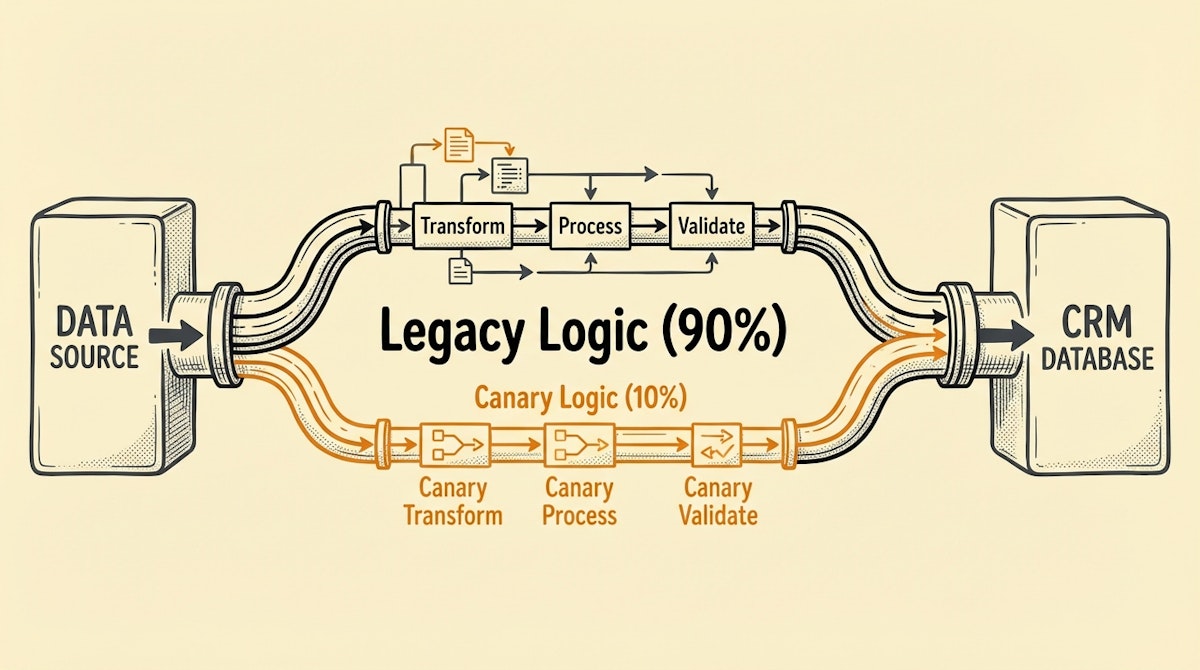
The Anxiety of the "Big Bang" Update
We have all stared at that "Activate" button with a knot in our stomach. You have spent weeks rebuilding the core Lead Routing automation to accommodate a new sales territory or a change in scoring logic. The logic looks sound in the sandbox. But once you push it live, it hits 100% of the inbound traffic immediately.
In software engineering, releasing a new version to everyone simultaneously is called a "Big Bang" deployment. In Sales Ops, it is the standard operating procedure—and it is terrifying. If there is an edge case you missed (like a specific lead source format or a null value in a country code), the error replicates across hundreds of records before you can hit pause.
Observing high-scale engineering teams like Meta (Facebook), they rarely deploy code this way. They use a system called "Gatekeeper" to perform Canary Deployments. They release the new logic to a tiny fraction of users—the "canaries in the coal mine"—and monitor for "gas leaks" (errors) before rolling it out to the rest.
For Sales Ops Managers and Growth Engineers, adopting this mindset shifts the deployment process from a moment of high risk to a controlled, gradual experiment.
The Architecture of a Canary Deployment
The goal is to route a small percentage of your data (e.g., 5-10%) through the New Logic while the rest continues to flow through the Legacy Logic. This is not just about A/B testing for conversion optimization; it is about operational integrity.
Implementing this in no-code tools like Make or n8n requires moving away from linear workflows and introducing a specific architectural component: The Traffic Splitter.
1. The Deterministic Split
A common mistake I see is using a Random() function to split traffic. While statistically valid for large numbers, it makes debugging a nightmare. If a lead fails in the new path, you want to be able to replay that specific lead and have it go down the same path again. Randomness destroys reproducibility.
Instead, use a Deterministic Hash. In your automation tool, take a unique identifier (like the Lead ID or Email Address) and convert it to a number. A simple approach is to map the last character of an ID to a number or calculate a CRC32 hash modulo 100.
This assigns every record a static "Bucket Number" between 0 and 99.
2. The Configuration Interface
Hardcoding "10%" into your automation logic is rigid. Following the Externalized Configuration principles, you should maintain a simple record in Airtable or a Global Variable in Make called Canary_Threshold.
- Current State: 0 (All traffic goes to Legacy)
- Test State: 10 (Traffic in buckets 0-9 goes to New; 10-99 goes to Legacy)
- Rollout State: 100 (All traffic goes to New)
3. The Monitoring Ledger
When a lead passes through the "Canary" path, tag it. In your CRM (Salesforce/HubSpot), populate a hidden field called Processing_Version with values like v1_legacy or v2_canary.
This allows you to build a dashboard that compares the "Health" of the two cohorts. Are leads in the Canary group getting assigned? Is the API error rate higher? If the Canary stops singing (i.e., errors spike), you simply change your Canary_Threshold variable back to 0. No rollback of complex code is required; just a routing change.
Comparison: Deployment Strategies
Different strategies offer different balances of speed versus safety. For critical data infrastructure, safety usually wins.
| Strategy | Risk Profile | Rollback Speed |
|---|---|---|
| Big Bang | High (All-or-Nothing) | Slow (Revert Changes) |
| Blue/Green | Medium (Instant Switch) | Fast (Switch Back) |
| Canary | Lowest (Gradual) | Instant (Variable Change) |
Why This Matters for Data Integrity
The Sales Ops Manager often faces pushback because past automations have "broken" the sales process. By adopting the Canary Deployment Process, you demonstrate technical maturity. You are not guessing; you are engineering reliability.
This method also solves the "Monday Morning Panic." You can deploy a change on Friday afternoon to 1% of traffic. If nothing breaks over the weekend, you increase to 10% on Monday, then 50% on Tuesday. You decouple the deployment of the build from the release of the feature.
Automation is powerful, but it is also fragile. Treating your no-code workflows with the same rigor that Facebook treats its server infrastructure ensures that when you scale, your data foundation holds firm.

