Checklist: The Financial Input Sanitation Process (Ref: Stripe)
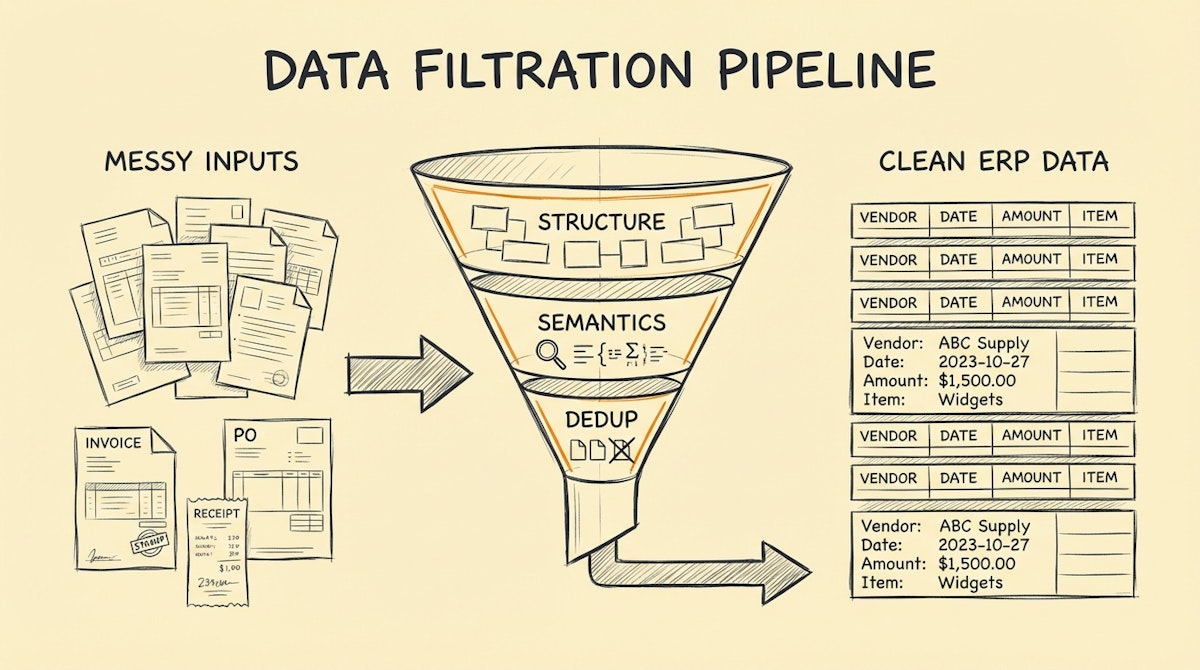
We often treat the Financial Controller as a cleaner. By the time data reaches them—whether it’s expense reports, vendor invoices, or sales records—it is often messy, unstructured, and riddled with errors. The Controller then spends the first week of every month fixing date formats, chasing missing tax IDs, and reconciling duplicates in Excel before they can even begin their actual work of analysis and strategy.
From what I have observed in scaling operations, the most efficient finance teams don't just clean data faster; they stop dirty data from entering the ledger in the first place. They act less like cleaners and more like gatekeepers.
This approach draws inspiration from Stripe’s API philosophy. Stripe is famous for its strict input validation and idempotency keys, ensuring that financial data is handled precisely once and in the correct format, regardless of how many times a user meshes the button. We can apply this same rigor to internal automation using tools like Make, n8n, or Zapier.
Below is a checklist to implement a "Financial Input Sanitation" layer—a pre-processing step that sits between your data sources (emails, forms, CRMs) and your ERP (QuickBooks, Xero, Netsuite).
Phase 1: Structural Validation (The Shape of Data)
Before worrying about what the data says, we must verify that it looks correct. Automation breaks easily when a date is in MM-DD-YYYY format when the system expects DD-MM-YYYY.
1. Enforce ISO 8601 Date Formatting
Every timeline-based automation should force dates into the YYYY-MM-DD standard immediately upon ingestion. I recommend using a simple formatter step in your workflow tool to parse natural language dates (e.g., "Oct 5th") into this rigid ISO format before passing it to any accounting software.
2. Standardize Currency Codes
Don't rely on symbols like "$" or "€". They are ambiguous (CAD vs USD vs AUD). The sanitation layer must map all monetary values to their 3-letter ISO code (USD, EUR, GBP). If the currency is missing from the input, the automation should reject the record or flag it for manual review, rather than defaulting to the home currency.
3. Number Parsing and Decimal Precision
OCR tools often read data with varying decimal separators (commas vs. dots) depending on the vendor's country. A robust sanitation step explicitly strips non-numeric characters and enforces a 2-decimal floating-point format to prevent rounding errors in the ledger.
| Data Point | Raw Input (Risk) | Sanitized Output (Safe) |
|---|---|---|
| Transaction Date | 12/04/23 (Ambiguous) | 2023-12-04 (ISO 8601) |
| Amount | $1,200.50 (String) | 1200.50 (Number) |
| Vendor Name | AWS - Amazon Web Svcs | Amazon Web Services |
Phase 2: Semantic Normalization (The Meaning of Data)
Once the structure is safe, we need to understand the context. This is where LLMs (like GPT-4 or Claude 3) shine in a finance workflow. They act as the "interpreter" between messy human inputs and rigid accounting codes.
4. Vendor Name Normalization (Fuzzy Matching)
Your ERP probably has a vendor named "Amazon Web Services". However, invoices might come in as "AWS", "Aws.com", or "Amazon Payments".
Instead of creating new vendors for each variation (a nightmare for spend analysis), use a semantic classifier step. Feed the incoming name and your list of existing vendors to an LLM prompt: "Map the input 'AWS' to the closest match in this list. If no close match exists, return null." This keeps your vendor list clean.
5. GL Code Classification
Automating General Ledger (GL) coding is risky if done deterministically (keyword matching). A better approach is providing an LLM with your Chart of Accounts and the line-item description. Ask it to suggest the appropriate code and, crucially, a confidence score. If the confidence is below 90%, route it to a human; otherwise, process it automatically.
Phase 3: Integrity & Deduplication (The Safety Net)
This is the most critical phase for the Financial Controller. It ensures that the automation doesn't accidentally double-count expenses or process fraudulent documents.
6. Idempotency Check (Duplicate Prevention)
Every financial transaction needs a unique fingerprint. If you are processing invoices, generate a hash based on Vendor Name + Date + Total Amount. Before creating a record in the ERP, the automation must search for this hash.
- If found: Stop (it’s a duplicate).
- If not found: Proceed and log the hash.
This simple check prevents the common issue of paying an invoice twice because the vendor sent it via email and then via portal.
7. The "Quarantine" Bucket
Never delete bad data. If a record fails any of the checks above (ambiguous date, unknown vendor, low GL confidence), route it to a "Quarantine" table (e.g., in Airtable or a specific Slack channel).
This creates a "Draft-and-Verify" workflow where the Controller only touches the exceptions, not the clean data. It shifts the workload from data entry to high-value review.
Implementation Note
You don't need expensive enterprise software to build this. A standard Make or n8n scenario can handle the routing, while an Airtable base can serve as the staging area/ledger for the hashes. The key is to be disciplined about the order of operations: Validate Structure $\rightarrow$ Normalize Semantics $\rightarrow$ Check Duplicates $\rightarrow$ Push to ERP.
By enforcing this sanitation process at the input level, you effectively "audit" the data before it ever touches your books, saving days of reconciliation work at month-end.

