Checklist: Automating Policy Enforcement With The AI Guardrail Process (Ref: Brex)
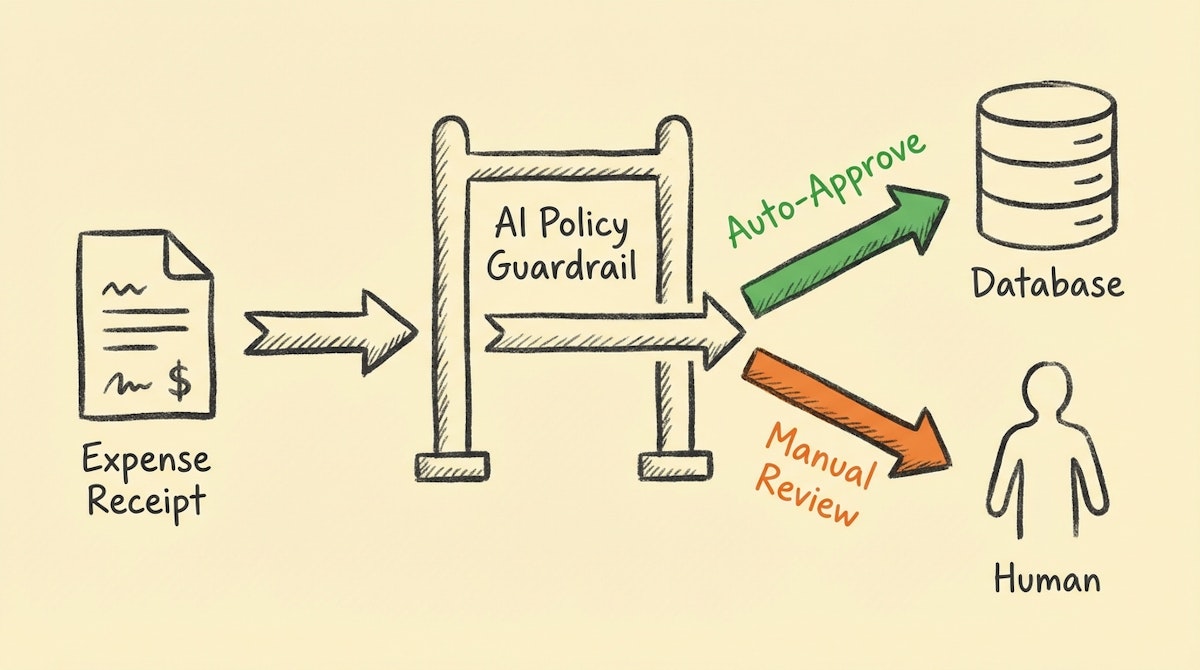
Table of Contents
- Introduction
- The Logic: Why Rules-Based Automation Fails
- The Checklist: Implementing The AI Guardrail
- 1. Digitize and "Chunk" Your Policy
- 2. Establish the Structured Input Layer
- 3. Configure the Semantic Validator (The Guardrail)
- 4. Architect the "Justification" Log
- 5. Set the Human-in-the-Loop Thresholds
- Conclusion
- References
Introduction
I have observed that for many Financial Controllers, the end of the month is less about strategic analysis and more about playing "bad cop." You are stuck manually reviewing hundreds of expense lines, checking if that $50 Amazon purchase was actually office supplies or a personal gadget, and cross-referencing it against a PDF policy that half the company hasn't read.
The traditional approach to solving this—rigid rules in ERPs—often fails because real life is nuanced. A software subscription might be compliant for Engineering but a violation for Sales. This nuance forces you back into manual review.
However, by applying what I call the AI Guardrail Process—a strategy popularized by modern fintechs like Brex and Ramp—you can automate the decision-making process, not just the data entry. This checklist outlines how to build a logic layer using tools like Make or n8n and an LLM (like GPT-4o or Claude 3.5 Sonnet) to act as your first line of defense.
The Logic: Why Rules-Based Automation Fails
Most finance teams rely on keyword matching (e.g., if description contains "Uber", categorize as "Travel"). This is brittle. The AI Guardrail Process replaces keyword matching with semantic understanding. It asks the system to read the receipt, read the policy, and make a judgment call.
Here is how the capability differs:
| Feature | Keyword Matching (Legacy) | AI Guardrail (Modern) |
|---|---|---|
| Context Awareness | None (Binary) | High (Semantic) |
| Policy Check | Hardcoded Limits | Nuanced Interpretation |
| Handling Exceptions | Breaks Workflow | Routes for Review |
The Checklist: Implementing The AI Guardrail
Use this checklist to audit your readiness and guide your implementation of an automated compliance layer.
1. Digitize and "Chunk" Your Policy
Your automation cannot read a 40-page PDF effectively every time a transaction occurs. You must convert your policy into a system prompt compatible with an LLM.
- [ ] Extract Core Principles: Identify the specific limits (e.g., "Meals under $50/head", "No First Class flights").
- [ ] Remove Ambiguity: Ensure terms like "reasonable" are defined with numerical or categorical proxies in the prompt instructions.
- [ ] Create a "Policy Object": Store these rules in a text node in your automation tool (Make/n8n) to be injected dynamically into the AI's context window.
2. Establish the Structured Input Layer
Before validation, data must be clean. Unstructured emails or slack messages lead to hallucinations.
- [ ] Standardize Ingestion: Use a form (Airtable, Typeform) or a dedicated OCR tool (like Nanonets) to capture the receipt.
- [ ] Enforce Metadata: Ensure every request includes
Vendor,Amount,Category, andBusiness Purposebefore it reaches the AI. - [ ] Sanitize Inputs: Strip HTML and excessive whitespace from OCR text to save tokens and reduce noise.
3. Configure the Semantic Validator (The Guardrail)
This is the engine. You are not asking the AI to "approve"; you are asking it to "assess against criteria."
- [ ] Define the Persona: Instruct the LLM to act as a "Strict Financial Controller."
- [ ] Input the Triple Constraints: Feed the prompt three things: 1. The Transaction Details, 2. The Policy Rules, 3. The Employee's Department/Role.
- [ ] Request Boolean JSON Output: Do not let the AI chat. Force a JSON response:
{"compliant": true/false, "flag_reason": "..."}.
4. Architect the "Justification" Log
Trust is built through transparency. You need to know why the automation approved a transaction.
- [ ] Create an Audit Field: In your ERP or database (e.g., Airtable), add a "Compliance Note" field.
- [ ] Map the Logic: Save the AI's
flag_reasoninto this field. Example: "Approved: Meal is under $50 cap and occurs during business travel dates." - [ ] Timestamp the Decision: Record exactly when the automated check occurred for future audits.
5. Set the Human-in-the-Loop Thresholds
Blind automation is dangerous in finance. Implement a Confidence-Based Routing logic.
- [ ] Define the Green Lane: If
compliantistrueAND confidence is High -> Auto-Approve. - [ ] Define the Orange Lane: If
compliantisfalseOR confidence is Low -> Send to Slack/Teams for manual review. - [ ] Create the Kill Switch: Ensure you have a mechanism to pause the automation if the policy changes or errors spike.
Conclusion
The goal of the AI Guardrail Process is not to remove the Financial Controller from the loop, but to elevate them. By automating the verification of standard, policy-compliant transactions, you eliminate the mental load of checking routine receipts. This shifts your role from "transaction verifier" to "policy architect," focusing on the exceptions that actually pose a risk to the business.
References
- Brex - Expense Management Philosophy: https://www.brex.com/blog/expense-management-automation
- OpenAI - Structured Outputs Guide: https://platform.openai.com/docs/guides/structured-outputs
- Make - Building Approval Workflows: https://www.make.com/en/blog/approval-workflows

