Teardown: Canva’s PQL Handoff Through The Signal-Based Routing Process
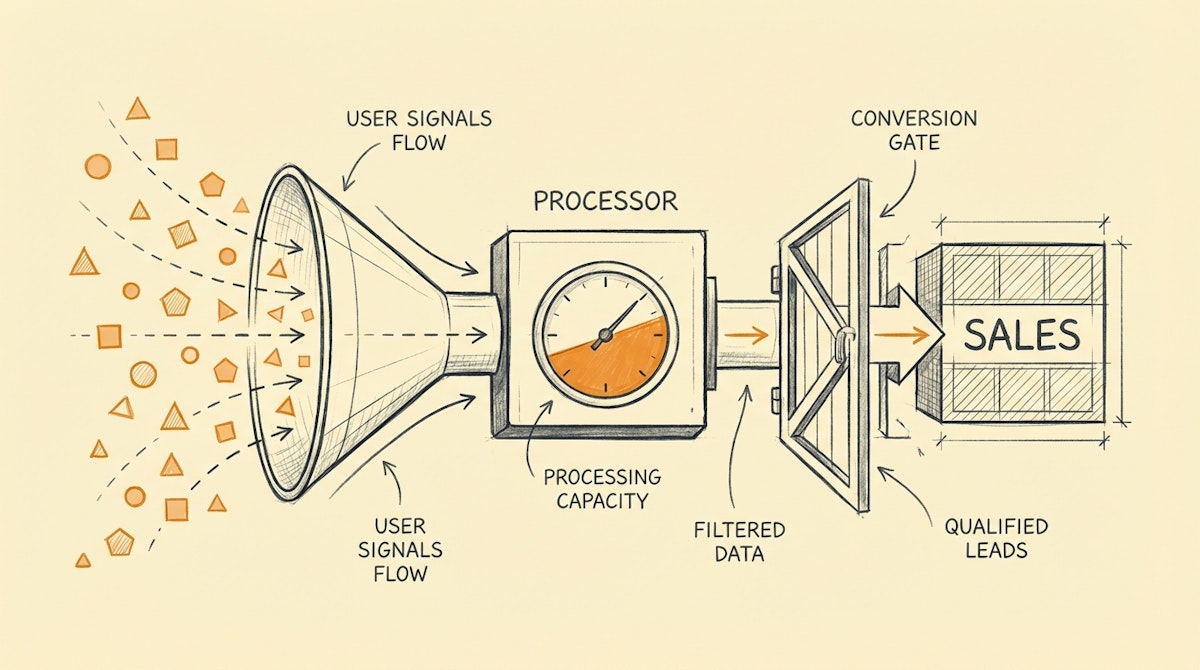
While analyzing the meteoric rise of Product-Led Growth (PLG) giants like Canva or Slack, it is easy to fixate on their user interface or viral loops. But for those of us working in the engine room of Sales Operations, the most impressive mechanism isn't the design tool—it is the invisible handoff between their free product and their enterprise sales team.
The challenge is universal: Sales teams constantly push back on lead quality. If you route every signup to a rep, you drown them in noise. If you gate everything behind a "Contact Sales" form, you lose volume. The middle ground—routing based on behavior rather than just demographics—is often discussed but rarely implemented because standard CRMs aren't built to listen to product usage events in real-time.
From what I have observed in the market, companies like Canva mastered the Product Qualified Lead (PQL) model. They don't just wait for a user to raise their hand; they wait for a specific set of usage signals—inviting a 5th team member, uploading a brand kit, or hitting a paywall—to trigger a sales conversation.
Below is a teardown of this logic and a proposal for a Signal-Based Routing Process that we can build using low-code automation tools like Make or n8n, coupled with a flexible database like Airtable or Supabase, without needing a dedicated engineering team.
The Friction: Static vs. Dynamic Qualification
Most Sales Ops setups rely on static data: Job Title + Company Size. If a "VP of Marketing" at a "500+ employee company" signs up, they get routed. But often, that VP is just testing the waters and isn't ready to buy.
The Canva approach flips this. They likely care less about who you are initially and more about what you are doing. The friction arises when we try to implement this in a CRM like Salesforce or HubSpot, which typically expects a linear update, not a stream of high-velocity events.
To bridge this gap, we need an intermediate layer that acts as a signal aggregator.
The Blueprint: The Signal-Based Routing Process
This architecture moves the logic out of the CRM and into an automation workflow. It consists of three distinct phases: Ingestion, Scoring, and Activation.
1. The Ingestion Stream (The Listener)
Instead of connecting your product directly to your CRM (which creates noise), you send product events via webhooks to an automation platform (Make/n8n). These inputs are the "Signals."
Common signals might include:
- User invited a teammate.
- User exported a design in high resolution.
- User visited the "Pricing" page twice in 24 hours.
2. The State Aggregator (The Scorekeeper)
Since automation tools are stateless (they process one run at a time), you need a temporary database to hold the context. Airtable or a simple SQL database works well here. You aren't storing the whole customer profile, just their PQL Score.
- Event: User invites teammate.
- Logic: Lookup User ID -> Add +10 to "Engagement Score".
3. The Activation Threshold (The Router)
This is where the magic happens. The automation watches the score.
- Condition: IF
Score> 50 ANDSales_Contactedis FALSE. - Action: Create Deal in HubSpot -> Assign to Rep -> Send Slack Notification.
This ensures the Sales Rep only sees the lead when they are "hot," armed with context: "This user just invited their 5th team member."
Comparison: Static vs. Signal-Based
To visualize why this shift matters for rep productivity, let's look at the operational differences.
| Feature | Static Routing (Standard) | Signal-Based Routing (PQL) |
|---|---|---|
| Trigger | Form Submit / Field Change | Accumulated Events |
| Data Source | User-Inputted (Demographic) | System-Observed (Behavioral) |
| Rep Context | Low (Who they are) | High (What they did) |
| CRM Load | High (All leads enter) | Low (Only qualified enter) |
Implementation Steps
If you want to pilot this without engineering resources, here is a simplified approach:
- Identify 3 Key Signals: Don't overcomplicate it. Pick three actions that correlate with buying intent (e.g., hitting a usage limit).
- Set up a Catch Hook in Make: Have your product (or even an email marketing tool like Customer.io) send a webhook when these events occur.
- Update a Lookup Table: Use a simple database to increment a counter against the user's email address.
- Fire the CRM Alert: When the counter hits your threshold, use the CRM API to create a task for the account owner.
Conclusion
We often think of "Enterprise Sales" and "Product-Led Growth" as opposing strategies. In reality, the most efficient Sales Ops environments use the latter to fuel the former.
By implementing a Signal-Based Routing Process, we stop asking sales reps to act as filters and start empowering them to act as closers. The goal isn't just to automate the data entry; it is to automate the timing of the sales outreach, ensuring it happens exactly when the user is experiencing value, not just when they fill out a form.
References
- What is Product-Led Growth? (OpenView Partners): https://openviewpartners.com/product-led-growth/
- Canva's Enterprise Strategy (SaaStr): https://www.saastr.com/canva-enterprise-strategy/
- The PQL Definition (ProductLed): https://productled.com/blog/product-qualified-leads-pqls

