Assembling The "Invisible CRM" Toolkit To Automate Sales Data Capture
We often talk about Sales Ops as a discipline of data and process, but in reality, it is largely a discipline of psychology. The most robust revenue engine fails if the inputs are missing. And usually, they are missing because the people responsible for the inputs—the sales representatives—perceive the CRM as an administrative burden rather than a productivity tool.
I have observed that the friction of logging calls, updating deal stages, and entering contact details creates a massive "adoption gap." When we force reps to conform to rigid schemas, they either revolt or do the bare minimum, leading to data decay.
Rather than trying to force behavior change through stricter governance (the "stick" approach), I believe the solution lies in meeting the reps where they already live. This is often referred to as decoupling the System of Engagement (where work happens) from the System of Record (where data lives).
Below is a toolkit for assembling what I call the "Invisible CRM"—a stack of tools designed to capture high-fidelity sales data without forcing reps to log into the CRM interface.
1. The Capture Layer: Slack and Mobile Interfaces
The goal here is to reduce the "time-to-log" to near zero. If a rep has to open a VPN, log in to Salesforce, navigate to an opportunity, and click "Edit," you have already lost them. We need interfaces that are always open.
Slack Workflow Builder / Microsoft Teams
Instead of a destination, use the communication hub as the input form.
- Role: The primary interface for quick updates (e.g., "Moved deal to negotiation").
- Why: Reps are already in Slack. Using a simple slash command or a Workflow form reduces context switching.
Audio Memos (Voice-to-Text)
For field sales or post-meeting brain dumps, typing is too slow.
- Tools: Native phone voice memos or dedicated apps like Otter.ai.
- Integration: These files are sent via email or webhook to the processing layer. The raw audio is the most effortless data entry method available.
2. The Semantic Processing Layer: LLMs
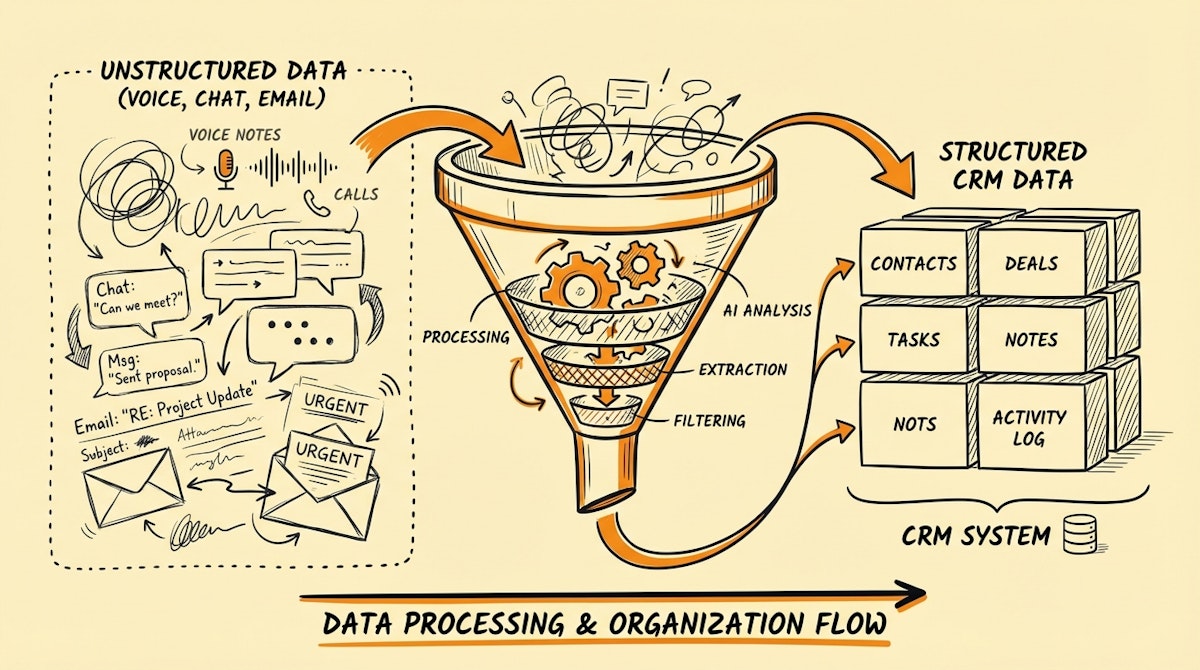
This is the component that makes the "Invisible CRM" viable today. Previously, we needed strict forms because machines couldn't understand "I just met with Alice, she needs a quote by Friday." Now, we can pipe unstructured text or audio into an LLM to extract the structured JSON required by the CRM.
OpenAI (GPT-4) or Anthropic (Claude 3)
- Role: The parser and cleaner.
- Application: You send the raw text from Slack or the transcript from the voice memo. You provide a system prompt that includes your CRM's schema (Deal Stages, Required Fields). The model returns a structured object ready for database insertion.
3. The Orchestration Layer: Make or n8n
This is the glue. You need a low-code platform to receive the webhook from the Capture Layer, pass it to the Processing Layer, and finally update the CRM.
Make (formerly Integromat)
- Role: The router.
- Why: Its visual error handling is crucial here. If the LLM returns an ambiguous result (e.g., two contacts named "Alice"), you can build a logic branch that sends a message back to the rep on Slack asking for clarification ("Did you mean Alice Smith or Alice Jones?").
Comparing the Workflow
When considering implementing an Invisible CRM stack, it helps to visualize the shift in burden from the human to the machine.
| Metric | Standard CRM Entry | Invisible CRM Stack |
|---|---|---|
| Input Friction | High (Multi-click UI) | Low (Chat/Voice) |
| Data Structure | Enforced by Form | Inferred by AI |
| Adoption Risk | Resistance & Decay | Trust & Hallucination |
| Feedback Loop | Passive (Dashboards) | Active (Slack Nudges) |
4. The Validation Layer: Airtable (Optional)
Sometimes, Sales Ops managers are uncomfortable letting an AI write directly to the System of Record (Salesforce/HubSpot). In these cases, I recommend an intermediate holding tank.
Airtable
- Role: The staging area.
- Process: The automation writes the drafted update to an Airtable interface. The rep (or a manager) reviews the "Draft Updates" once a day and clicks "Sync" to push them to the CRM. This is the Draft-and-Verify Interface approach.
Conclusion
The goal of this toolkit is not to replace the CRM, but to protect it. By acknowledging that sales reps prioritize speed over administrative precision, we can build systems that accommodate their behavior rather than fighting it.
The "Invisible CRM" reduces the cognitive load on the revenue team. While it introduces technical complexity for Operations (maintaining the Make scenarios and LLM prompts), the tradeoff is often worth it: a database that actually reflects reality.
References
- Salesforce acquisition of Slack for Systems of Engagement
- OpenAI Function Calling for Structured Data Extraction
- Make.com Scenario Editor Documentation

