Quick Tip: Stopping CRM Duplicates With The Search-Or-Create Logic (Ref: HubSpot)
The Hidden Cost of "Blind Creates"
One of the most frequent complaints I hear from Sales Ops managers isn't about the lack of automation—it's about the chaos created by bad automation. Specifically, the proliferation of duplicate records in the CRM.
A classic scenario: A lead fills out a Typeform, an automation runs, and a new Contact is created in Salesforce or HubSpot. Two days later, they attend a webinar, and another automation runs, creating a second Contact record.
Now, the sales rep has two fragmented views of the same person. Activity history is split, lead scoring is diluted, and attribution becomes a nightmare. If you multiply this by thousands of leads, your CRM turns into a graveyard of redundant data.
The root cause is usually what I call the "Blind Create" action. This occurs when an automation workflow is triggered and immediately instructs the target system to "Create a Record" without checking the existing state of the database.
To fix this, we need to adopt a fundamental principle of data engineering: Idempotency. In simple terms, running the same operation multiple times should not change the result beyond the initial application. In our context, this means implementing the Search-Or-Create Logic.
The Logic: Look Before You Leap
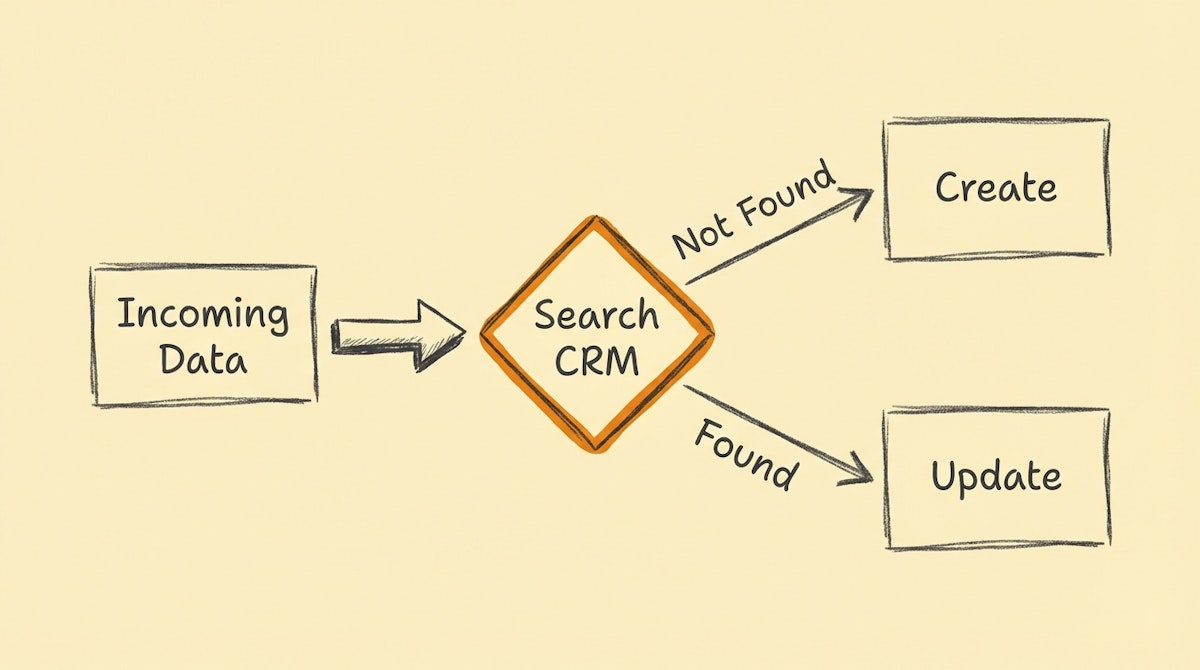
The solution is deceptively simple but often skipped during the excitement of building a new Zap or Make scenario. Instead of a linear "Trigger -> Create" flow, we must insert a "Search" step as a gatekeeper.
Here is the standard architectural pattern for any inbound data flow:
- Ingest Data: Receive the webhook or form submission.
- Normalize Key: Clean the unique identifier (email or domain).
- Search: Query the CRM for this key.
- Router/Path:
- If Found: Update the existing record (Enrichment).
- If Not Found: Create a new record (Acquisition).
While platforms like HubSpot have built-in deduplication for standard imports, API-driven automations often bypass these safeguards depending on the endpoint used. Manually enforcing this logic ensures your data integrity remains platform-agnostic.
Choosing the Right Search Key
The success of this logic depends entirely on the reliability of the "Search Key." If you search by "Company Name," you will fail. "Acme Inc." and "Acme, Inc." are different strings to a computer, resulting in duplicates.
For B2B Sales Ops, reliance on Unique Identifiers is non-negotiable.
| Search Key Strategy | Reliability | Risk Factor |
|---|---|---|
| Company Name | Low | High (Fuzzy matches fail) |
| Person Name | Very Low | Extreme (Common names collide) |
| Email Address | High | Low (People change jobs) |
| Root Domain | Very High | Negligible (Unique per entity) |
Implementation in Low-Code Tools
I have observed that different platforms handle this logic differently. Here is how you can standardize this process across the most common tools.
In Zapier
Zapier separates these actions explicitly. You typically need to add a "Find Record" step (e.g., "Find Contact in HubSpot").
However, there is a crucial feature within this step called "Create HubSpot Contact if it doesn’t exist yet?" (often a checkbox at the bottom of the setup).
- The Trap: Many users tick this box and rely on the "magic" step. While convenient, it often limits which fields you can map during creation compared to a dedicated "Create" step.
- The Better Approach: Use the "Find" step without creation. Then, use a "Paths" step. Path A continues if the
Record IDexists. Path B continues if theRecord IDis missing. This gives you granular control over how you handle updates vs. new creations.
In Make (formerly Integromat)
Make offers a more elegant solution with specific modules, but the logic remains manual for most apps.
- Get a Record: Search CRM by Email.
- Resume Directive: Right-click the module and set an "Error Handler." If the search returns an error (Not Found), you can direct the flow to a Create module.
- Router Method: A cleaner way is to search, then add a Router. Route 1 has a filter
Record ID exists; Route 2 has a filterRecord ID does not exist.
Note: Some apps in Make, like Airtable, have an "Upsert" (Update or Insert) module which abstracts this complexity entirely. Always look for "Upsert" functionality first.
Advanced Nuance: The Root Domain Extraction
If you are routing leads to Accounts based on Company, the email domain is your best friend, but it requires cleaning. A common mistake is searching for https://www.acme.com when the CRM stores acme.com.
Before your Search step, add a simple Text Formatter step to strip protocols and subdomains. If you skip this normalization, your Search-Or-Create logic will return a "False Negative," creating a duplicate Company record simply because of a www. prefix.
The ROI of Idempotency
Implementing the Search-Or-Create logic takes an extra 5 to 10 minutes per automation scenario. However, the downstream savings are massive.
By preventing duplicates at the ingress point, you:
- Reduce API Usage: You avoid later having to run heavy "deduplication" batch jobs that eat up API quotas.
- Increase Trust: Sales reps stop doubting the data.
- Preserve Context: You successfully append new intent signals (like a whitepaper download) to the existing history of a lead, rather than starting a fresh, empty profile.
In the world of Sales Ops, data integrity isn't just a nice-to-have; it's the foundation of every forecast and commission check. Treating every automation as an "Update First" operation is the quickest win for cleaner operations.
References
- HubSpot Knowledge Base: Deduplication of contacts, companies, deals, tickets, and custom objects
- Make Help: Error Handling and Resume Directives
- Zapier Help: Search and Create actions

