Reviewing Customer.io: The Event-Driven Logic Engine For Behavioral Targeting
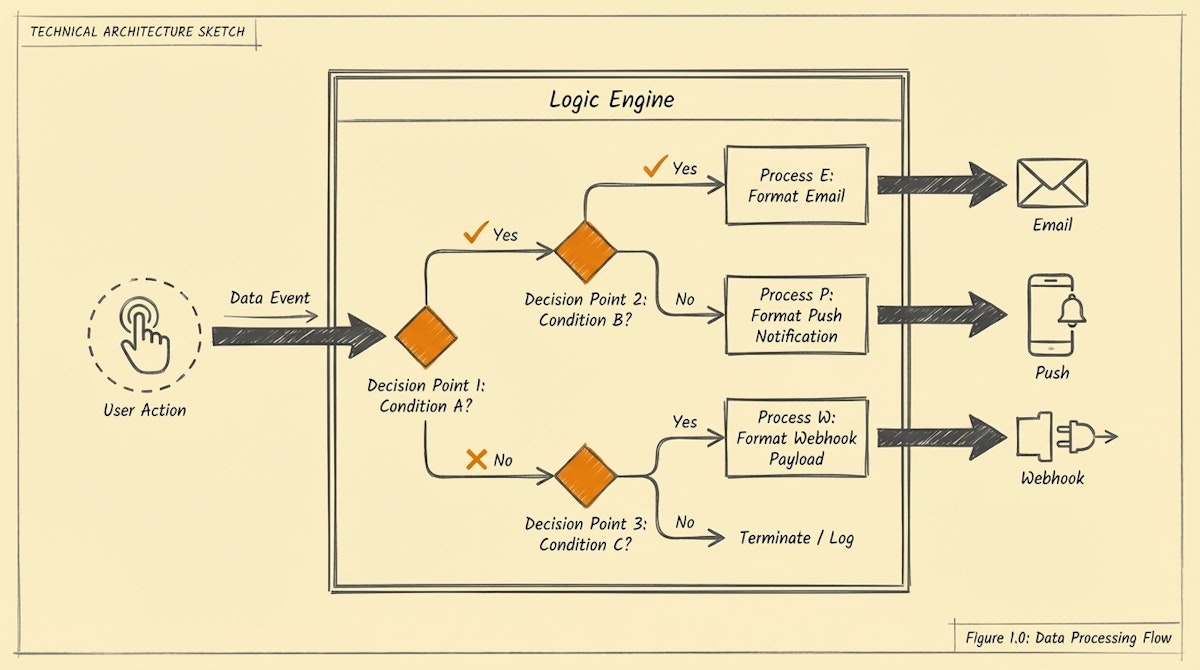
Table of Contents
- The Disconnect Between Product Events and Marketing Channels
- Core Architecture: The Behavior-State Synchronization Process
- Key Features Analysis
- Integration Potential: The Make & Airtable Bridge
- Pros and Cons Breakdown
- Verdict: When to Migrate
The Disconnect Between Product Events and Marketing Channels
One of the most persistent technical gaps I encounter when auditing growth stacks is the latency between a user taking an action in an application and the communication they receive in response. Standard marketing automation platforms (MAPs) often operate on static lists or delayed syncs with a CRM.
For a Growth Engineer, this creates a friction point: you want to trigger a specific adoption guide exactly 15 minutes after a user fails to complete a specific setup step. If your data pipeline relies on a nightly CSV dump or a slow native CRM integration, the moment of influence is lost.
This review focuses on Customer.io, a platform that positions itself less as a traditional email service provider and more as a data activation engine. We will analyze its utility specifically for implementing what I call the Behavior-State Synchronization Process—a method of aligning messaging logic directly with user state changes.
Core Architecture: The Behavior-State Synchronization Process
Unlike toolsets that treat subscribers as rows in a spreadsheet, Customer.io treats users as objects with properties and real-time event logs. This architectural difference allows for a more granular approach to automation.
When we look at the "People" factor of user adoption, generic onboarding sequences often fail because they assume a linear path. Real user behavior is chaotic. The Behavior-State Synchronization Process relies on three components:
- Identity Resolution: Using a clear
id(usually the database user ID) rather than just an email address. - Event Ingestion: Streaming actions (e.g.,
viewed_pricing,clicked_export,invited_teammate) directly via API or Segment. - State-Based Routing: Logic that queries the user's current attribute values at the moment of send, rather than the values they had when they entered the workflow.
Customer.io excels here because it separates the Trigger (the event) from the Filter (the condition). You can trigger a workflow on an event, but immediately check a separate data attribute to decide whether to proceed. This reduces the risk of sending irrelevant "Please complete your profile" emails to users who just finished doing so.
Key Features Analysis
1. Data-Driven Segments
Most tools use static lists. Customer.io uses dynamic segments defined by logic (e.g., "Users who signed up > 7 days ago AND have not performed event created_project"). These segments update in near real-time. For a Growth Engineer, this eliminates the need to build complex SQL queries or ask developers to pull lists for A/B testing.
2. Liquid Templating Engine
This is where the technical ceiling is higher but the payoff is significant. You can use Liquid syntax (a templating language) to perform logic inside the message content.
- Example: You can loop through an array of data passed in the event payload (like a list of items left in a cart) and render a dynamic table in the email.
- Impact: This moves personalization beyond "Hi " to context-aware content that reflects the user's actual session data.
3. The Visual Workflow Builder
The visual builder is utilitarian. It supports branching logic, time delays, and time windows (e.g., "Wait until the user's timezone is 9:00 AM on a weekday"). While the UI is not as polished as some newer entrants, the reliability of the logic execution is high.
Integration Potential: The Make & Airtable Bridge
For readers of AutomationUseCases.com, the ability to play nice with the Core Toolkit (Make and Airtable) is a critical evaluation criteria.
Webhooks as a First-Class Citizen
Customer.io allows you to send and receive webhooks within any workflow step.
- Inbound: You can use a Make webhook to push data from Airtable into Customer.io to update user attributes without needing a full CDP.
- Outbound: This is the most powerful feature. When a user reaches a specific milestone in Customer.io (e.g., becomes a "Power User"), you can fire a webhook to Make. Make can then update the record in Airtable, send a Slack notification to the Sales team, or even unlock a feature in your app via API.
This turns Customer.io into the "Brain" of the adoption journey, while Make handles the cross-platform execution.
Pros and Cons Breakdown
| Feature | Pros | Cons |
|---|---|---|
| Data Handling | Handles massive volume of events with low latency. Acts as a lightweight CDP. | Heavy reliance on technical integration (Segment or API) for best results. |
| Logic | Extremely flexible segmentation and "wait until" conditions. | Learning curve for Liquid syntax is steep for non-technical marketers. |
| Channel Support | Email, SMS, Push, and In-App messages in one flow. | The visual editor for email design is functional but lacks some modern design constraints. |
| Pricing | Based on profile count, not email send volume. | Can get expensive quickly if you store free users/leads who are not monetizing. |
Verdict: When to Migrate
Customer.io is not a newsletter tool; it is an infrastructure component for Product-Led Growth.
This tool is for you if:
- You are a Growth Engineer or Technical Marketer handling SaaS or mobile app adoption.
- You have access to product event data (via Segment, Rudderstack, or direct API access).
- You need to orchestrate complex journeys that branch based on what a user doesn't do.
This tool is not for you if:
- You primarily send broadcast newsletters or content updates.
- Your data lives entirely in a static CSV or basic Google Sheet.
- You do not have the resources to set up event tracking.
By implementing the Behavior-State Synchronization Process through Customer.io, you reduce the noise for your users and increase the relevance of every touchpoint. It requires an initial investment in data hygiene, but the dividend is an automated adoption engine that scales without constant manual intervention.

